
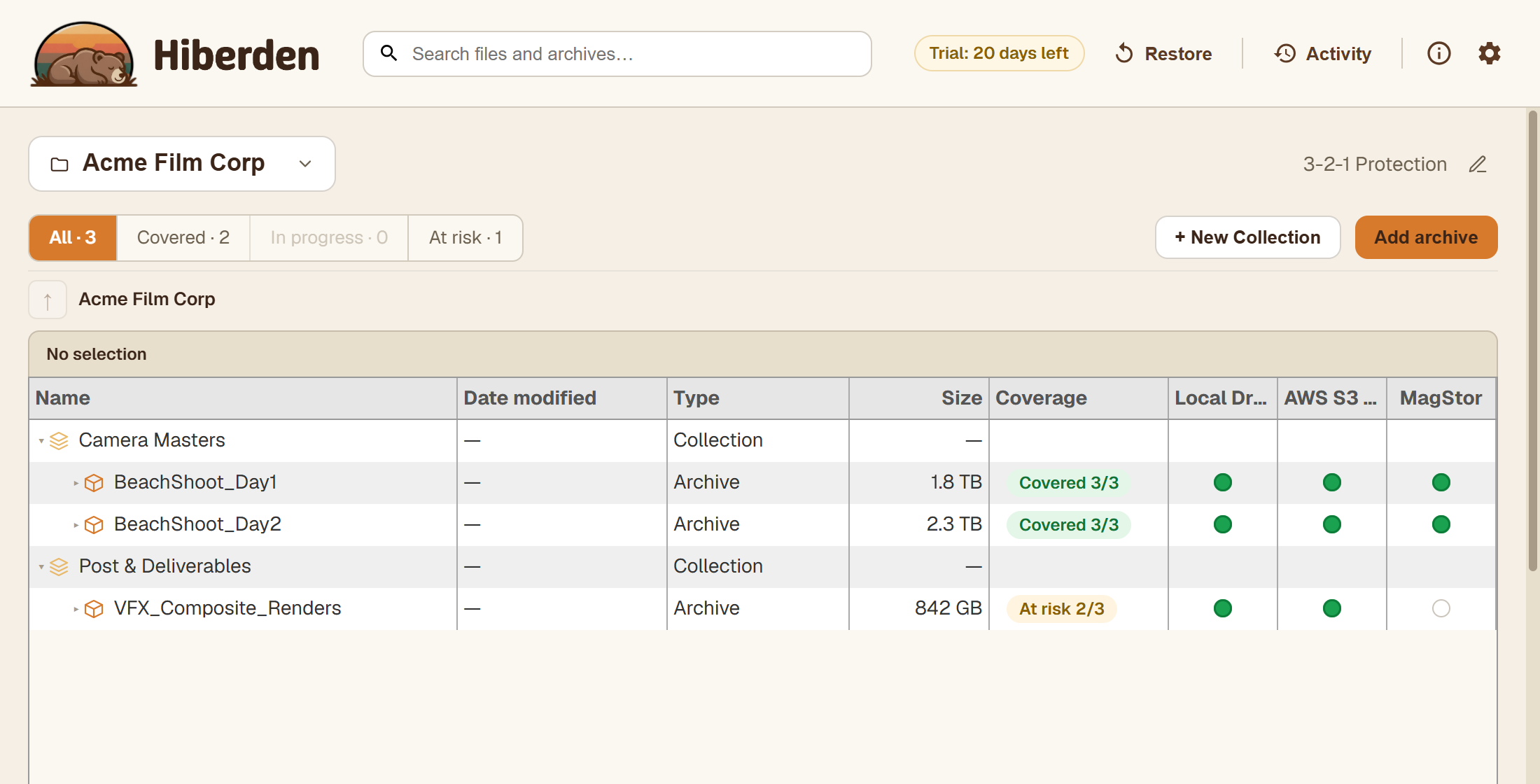
Every archive in the workspace carries a coverage badge. It answers one question at a glance: does this archive have a verified copy on every destination its policy requires? Coverage is always computed the same way, by comparing the copies Hiberden has actually verified against the copies the project's policy calls for. A copy only counts once it has passed a full read-back: Hiberden re-reads the stored bytes and re-hashes them against the recorded SHA-256. See How verification works.
The five states
- Covered (green): every destination the policy requires has a verified copy. This is the goal state.
- At risk (amber): some of the required destinations have a verified copy, but not all of them. The archive exists somewhere verified, just not everywhere it should.
- Unprotected (red): the policy has bindings, but no verified copy exists anywhere and nothing is being written right now.
- In progress (blue): a copy is currently being written. The badge settles into one of the other states when the write (and its read-back) finishes.
- Needs setup (grey): the project has no policy, or its policy has no bindings. Hiberden cannot say whether the archive is covered because nothing defines what "covered" would mean. Assign a policy with at least one required copy to fix it. See Policies and required copies.
When the badge names the actual problem
"Unprotected" is a summary, and a summary is the wrong answer when Hiberden knows something more specific. Where the copies themselves say what went wrong, the badge says it instead:
- Files missing: the copies are not where the catalog expected them. The files were moved or deleted, or the drive or share is disconnected. Nothing has been proven corrupt; it could not be found.
- Check failed: a verification ran and did not pass. The bytes on the medium no longer match what was recorded.
The distinction matters because the responses differ. A missing copy is often a disconnected drive and comes back on its own once the medium is reachable. A failed check means that medium holds something other than what you archived, and that copy has to be written again from a good one. Verification failures covers both.
The fraction
Most badges show a fraction: verified copies over required copies. "Covered 3/3" means all three required destinations hold a verified copy. "At risk 1/3" means one of three is verified. Needs setup shows no fraction, because with no policy there is no requirement to measure against.
Per-destination dots
Next to the badge, each archive shows one dot per destination the policy requires. A filled dot means that destination holds a verified copy; an empty ring means it does not yet. The fraction tells you how many copies you are short; the dots tell you exactly which destination is missing its copy.
Filtering the workspace
The workspace has a coverage filter with live counts: All · N, Covered · N, In progress · N, At risk · N. One thing to know: the "At risk" filter bucket includes Unprotected archives as well as At-risk ones. That is deliberate. "Partially protected" and "not protected at all" are both gaps against a policy you have already set, so the filter groups them behind a single click instead of splitting them into separate lists. What the bucket does not include is Needs setup: there is no filter segment for grey badges, so archives with no policy or no bindings show up only under All.
A practical habit: open the At risk filter, look at the dots to see which destination each archive is missing, and fix the gap. When several destinations on one archive are empty, its details offer Fill missing copies, which writes them one after another from a copy you already have. Then scan All for grey Needs setup badges, because those archives need a policy assigned before coverage can be measured at all. If a copy exists but has never been checked, running a full verification will move it to Verified (or tell you the truth if it fails).